online courses Archives - Page 12 of 16 - DexLab Analytics | Credit Risk | Market Risk | SAS Python Machine Learning Modeling

What is Truly Efficient? Understanding Stratified Random Sample

What is Truly Efficient?  Understanding Stratified Random Sample:

We have discussed several times the efficiency of various techniques for selecting a simple random sample from an expansive dataset. With PROC SURVEYSELECT will do the job easily…


proc surveyselect data=large out=sample
	 method=srs   /* simple random sample */
	 rate=.01;   /* 1% sample rate       */
run;


However, let us assume that our data includes a STATE variable, and one would want to guarantee that a random sample includes the precise proportion of observations from each of the states of America.

Continue reading “What is Truly Efficient? Understanding Stratified Random Sample”

How to Assess Clustering Tendency: Unsupervised Machine Learning

How To Assess Clustering Tendency: Unsupervised Machine Learning

The meaning of clustering algorithms include partitioning methods (PAM, K-means, FANNY, CLARA etc) along with hierarchical clustering which are used to split the dataset into two groups or clusters of similar objects.

A natural question that comes, before applying any clustering method on the dataset is:

Does the dataset comprise of any inherent clusters?

A big problem associated to this, in case of unsupervised machine learning is that clustering methods often return clusters even though the data does not include any clusters. Put in other words, if one blindly applies a clustering analysis on a dataset, it will divide the data into several clusters because that is precisely what they are supposed to do. Continue reading “How to Assess Clustering Tendency: Unsupervised Machine Learning”

Here Are Four Predictions For AI This 2017!

Last year was the year, which saw artificial intelligence, went mainstream.


Here Are Four Predictions For AI This 2017!


By that, we do not mean just getting filtered raunchy photos on Twitter or getting the fake news suggestions on Facebook.

Here is what to look for in Artificial Intelligence for this New Year:

  • Driven by unprecedented financial support (along with a growing open source ecosystem), founders have been delivering artificial intelligence start-ups at a record high rate.
  • GE, Google, Intel, Microsoft, Facebook, Apple, Salesforce and Samsung, and several other name brands made rigorous AI investments last year.
  • There are now five million homes, which, are talking about their music and shopping choices with the help of Alexa from Amazon.
  • There is a whole new department of U.S. Department of Transportation Committee for self-driving cars. Even a few years ago, there were people talking about 2025 or so for the accessibility of self-driving cars (of level 5 autonomy), but this is a reality now, much before we could reach 2020. It is also amazing to think that self-driving cars may whittle down the 1.2 million annual deaths from automobiles.
  • Also in other interesting news, two AI unicorns just grew their horns, the Cylance in Silicon Valley and iCarbonX in China.
  • Also more than one-fifth of the MIT 50 smartest companies list, include AI as a core approach these days.

Continue reading “Here Are Four Predictions For AI This 2017!”

The Olympics Turn To Data Analysis: Canadian Olympic Committee Deals In With Analytics

The Canadian Olympic company has recently teamed up with a major Big Data Company to ramp up the analytics for the benefit of the athletes.

 
The Olympics Turn To Data Analysis: Canadian Olympic Committee Deals In With Analytics
 

Recently the COC made an announcement about an eight-year, cash and services sponsorship deal with SAS, which is an analytics software with a brag-worthy client list from varied industries, like universities, hotels, banks casinos and much more.

Continue reading “The Olympics Turn To Data Analysis: Canadian Olympic Committee Deals In With Analytics”

How to Use PUT and %PUT Statements in SAS: 6 Tips

The PUT statement in SAS for programmers who have completed a SAS certification in the DATA step and the %PUT macro statements are highly useful statements, which will help to enable you to display the values of variables and macro variables, respectively.


How to Use PUT and %PUT Statements in SAS: 6 Tips


And almost by default the output will appear in the SAS logs. In this article we will share a few tips which will allow you to make use of these statements more efficiently.

Continue reading “How to Use PUT and %PUT Statements in SAS: 6 Tips”

The Choice Between SAS Vs. R Vs. Python: Which to Learn First?

It is a well-known fact that Python, R and SAS are the most important three languages to be learnt for data analysis.


The Choice Between SAS Vs. R Vs. Python: Which to Learn First?


If you are a fresh blood in the data science community and are not experienced in any of the above-mentioned languages, then it makes a lot of sense to be acquainted with R, SAS or Python.

Continue reading “The Choice Between SAS Vs. R Vs. Python: Which to Learn First?”

How to Read Data With SAS JSON Libname Engine

To those of you unaware of the developments in the SAS world, JSON is the new XML and the number of users who need to access JSON has really grown in the recent times. This is mainly due to proliferation of REST-based APIs and other web services. A good reason for JSON being so popular is the fact that it is structured data in the format of text. We have been capable of offering simple parsing techniques, which make use of data step and most recently PROC DS2. Now with the SAS 9.4 and Maintenance 4 we now have a built-in libname engine for the JSON XML.


How to read data with SAS JSON libname engine


As a SAS training institute we strive to keep our students updated with the latest developments in the field of data analytics even after they move on. Continue reading “How to Read Data With SAS JSON Libname Engine”

Five Major Big Data Trends That Will Shape AI this New Year

Many still believe that Big Data is a grossly misunderstood, mega trending buzzword in the tech field even today. However, there is still no denying of the fact that the recent development of AI and machine learning push is related on the synthesis and labelling of huge amounts of training data. A latest trend report by the advisory firm Ovum predicted that the Big Data market which currently is valued to be USD 1.7 billion, will further rise to be USD 9.4 billion by 2020.


Five Major Big Data Trends That Will Shape AI This New Year


Then what do the insiders in the data analytics market see it happening in the upcoming year ahead? We at DexLab Analytics, the premiere Big Data Hadoop institute in Delhi spoke to several leaders in this field to discover.


Here is what we found to be the five most important trends that will shape the future of machine learning, AI and data analytics in 2017 from the industry experts:


The predictions strongly emphasize the need for more talent and skilled personnel in this vast field of data analytics, thus, a growing demand for Big Data training and Big Data courses will be witnessed worldwide.

Continue reading “Five Major Big Data Trends That Will Shape AI this New Year”

5 Tips for Creating Different Map Styles in Tableau

5 Tips for Creating Different Map Styles in Tableau

Let us not waste any time on reading long-worded introductions, and get right down to our 5 top tips for creating different map styles in Tableau.

You will be able to find out about these tips and a lot more on Tableau with our Tableau training courses.

  1. Removing map layer:

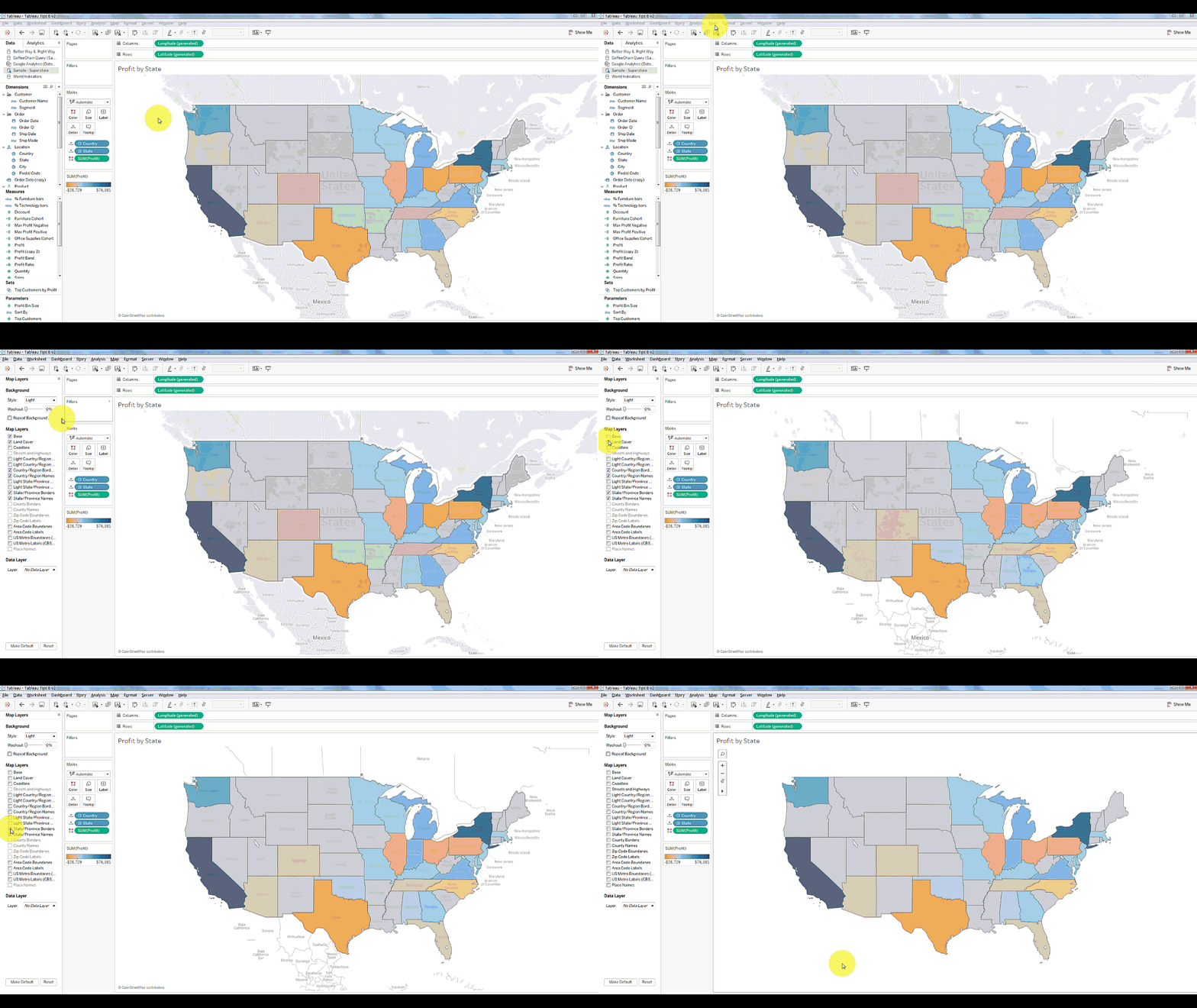
A simple way to create a clean map for best visualization is by removing the map layers. In order to do this, all you need to do is Select Map on the toolbar menu and “map layer”. Then simply click on the uncheck box and everything in the map layer window, this will leave behind only the outline of the map data.
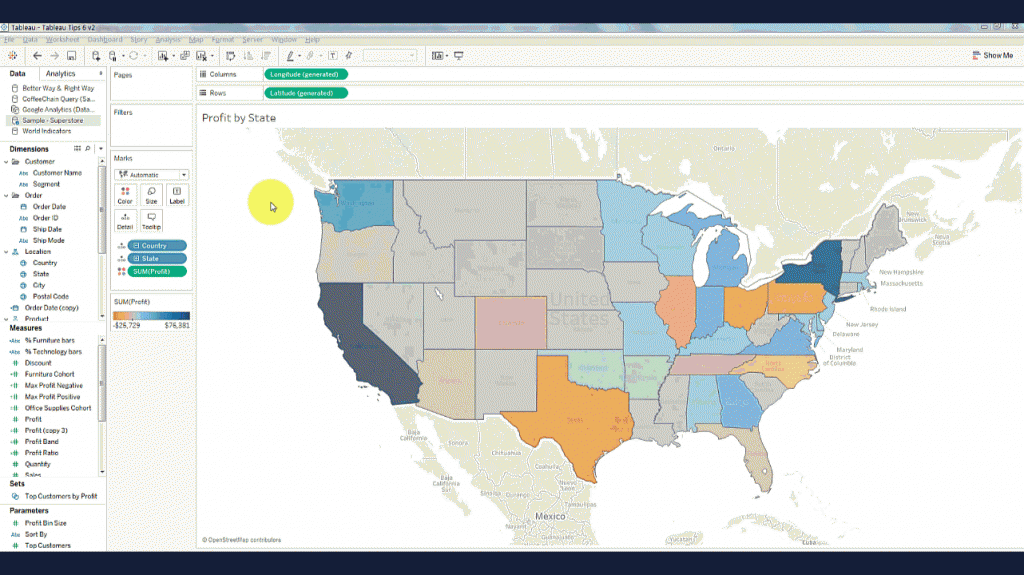
Removing map layer:

Image Source: dataplusscience.com


Tableau course details has all these steps and much more to learn about the software, you can know the details by visiting our Tableau training institute website.

  1. Changing the map border colours:

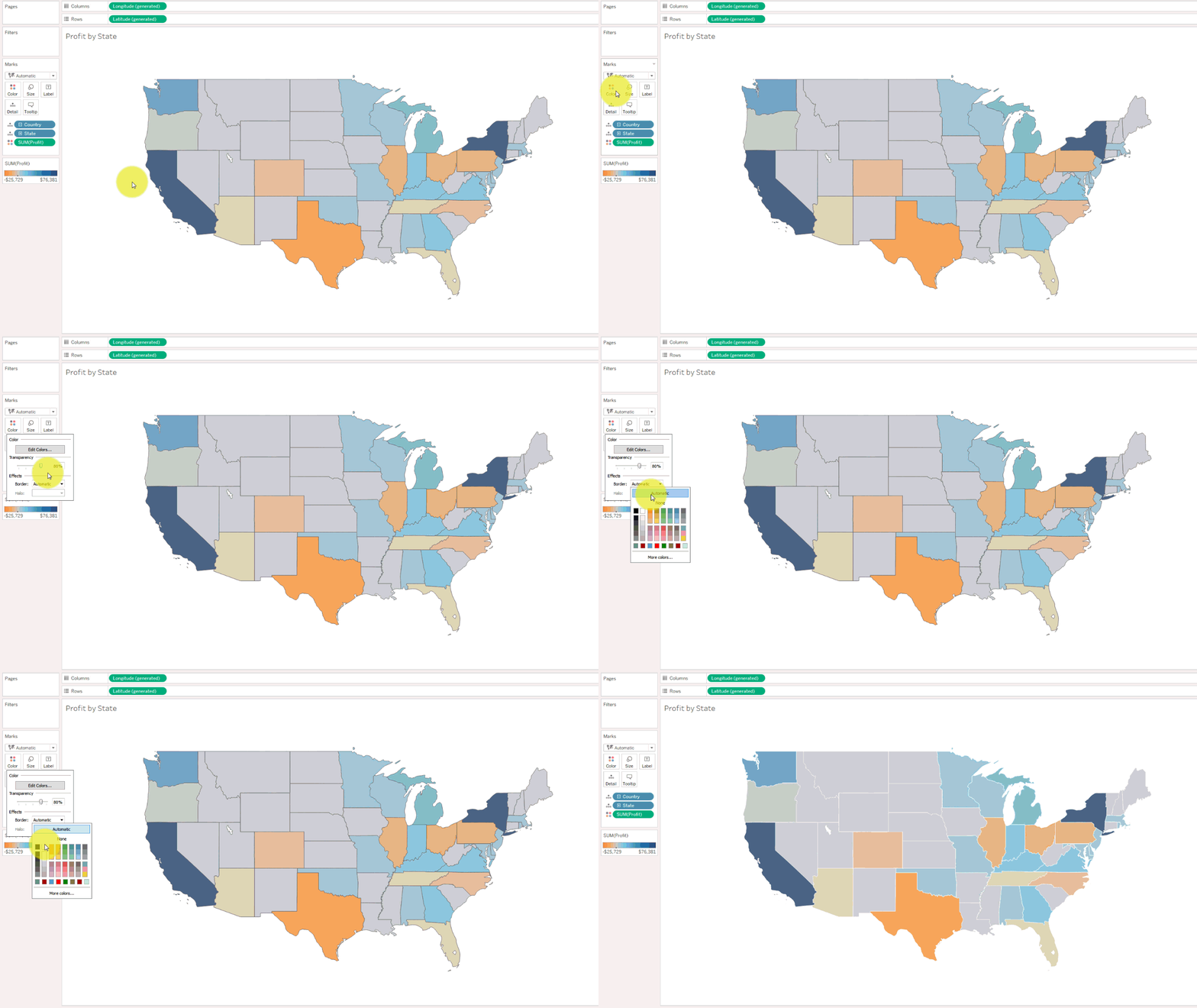
When you use map, you can change the border colours of the map under the option ‘Color’. Simply select the colour and choose the border colour that you desire.
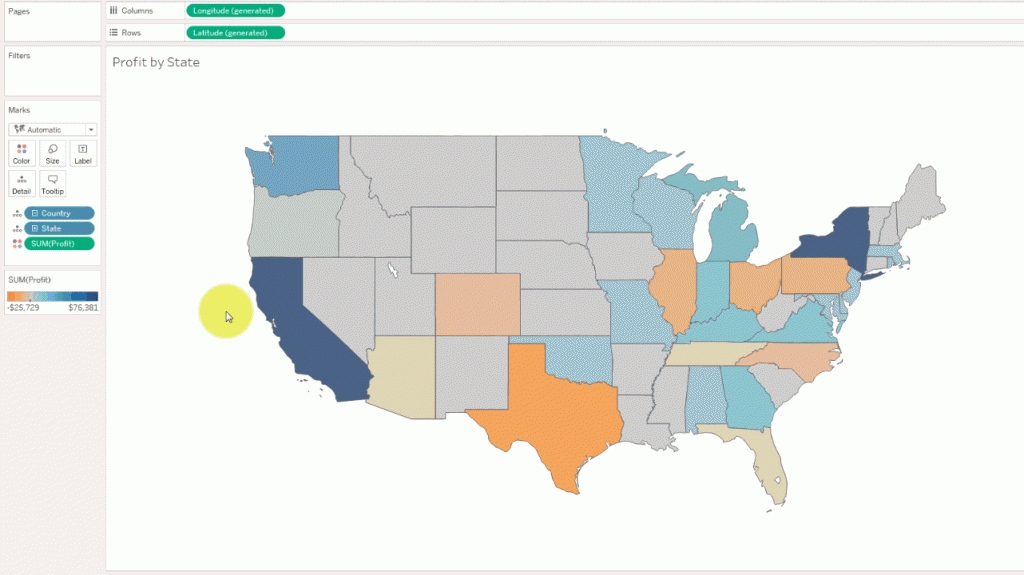
Changing the map border colours:

Image Source: dataplusscience.com


  1. Making the USA map outline:

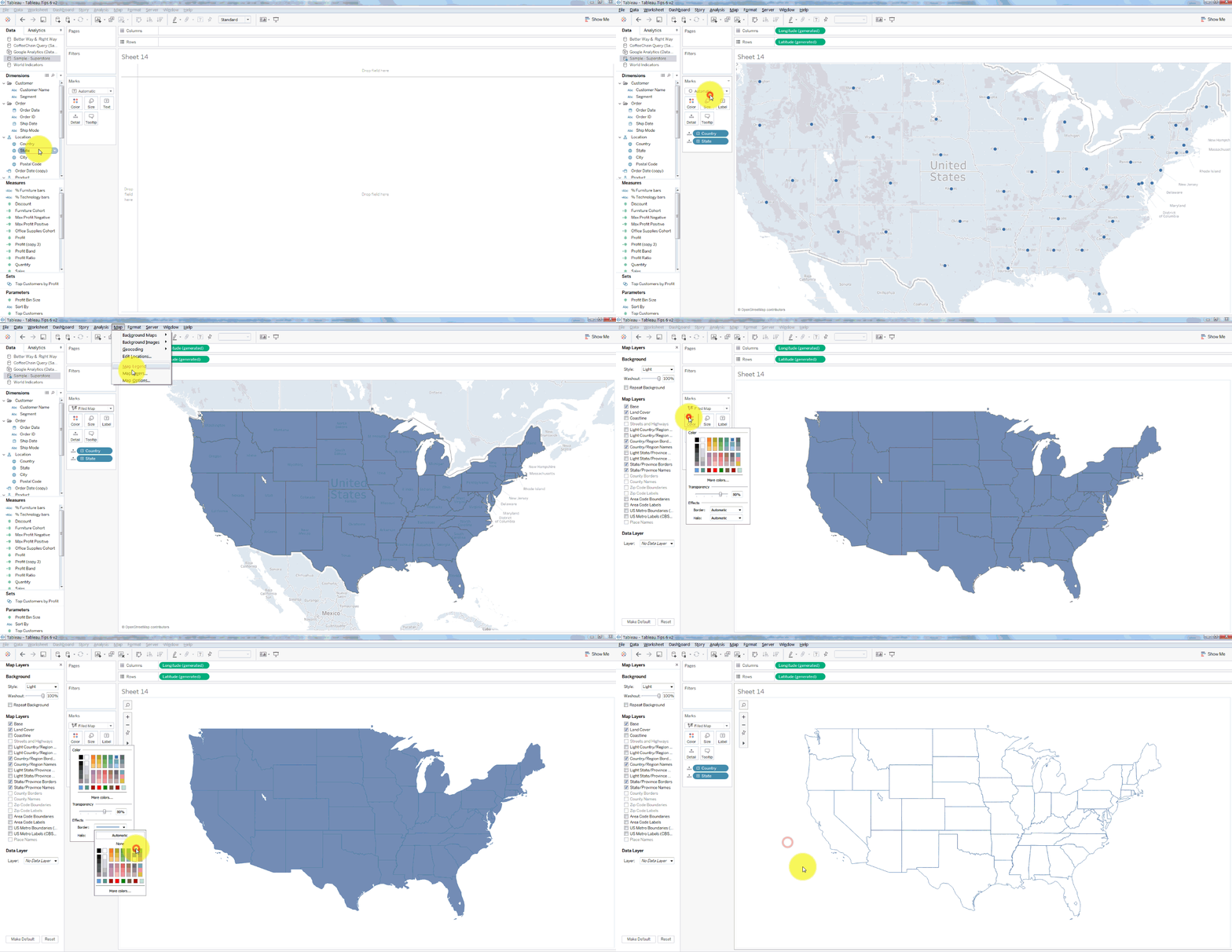
Combining the above mentioned step 1 and 2 and by clicking to remove the fill colour, we can create an outline of a map. To do so, first remove the map layer shown in step 1 and then set the map fill colour to match with the background colour. And voila! After selecting the desirable colour for the borders (as shown in step 2) we now have created just a simple outline of the map of USA!
Making the USA map outline:

Image Source: dataplusscience.com


  1. Making a minimalistic map:

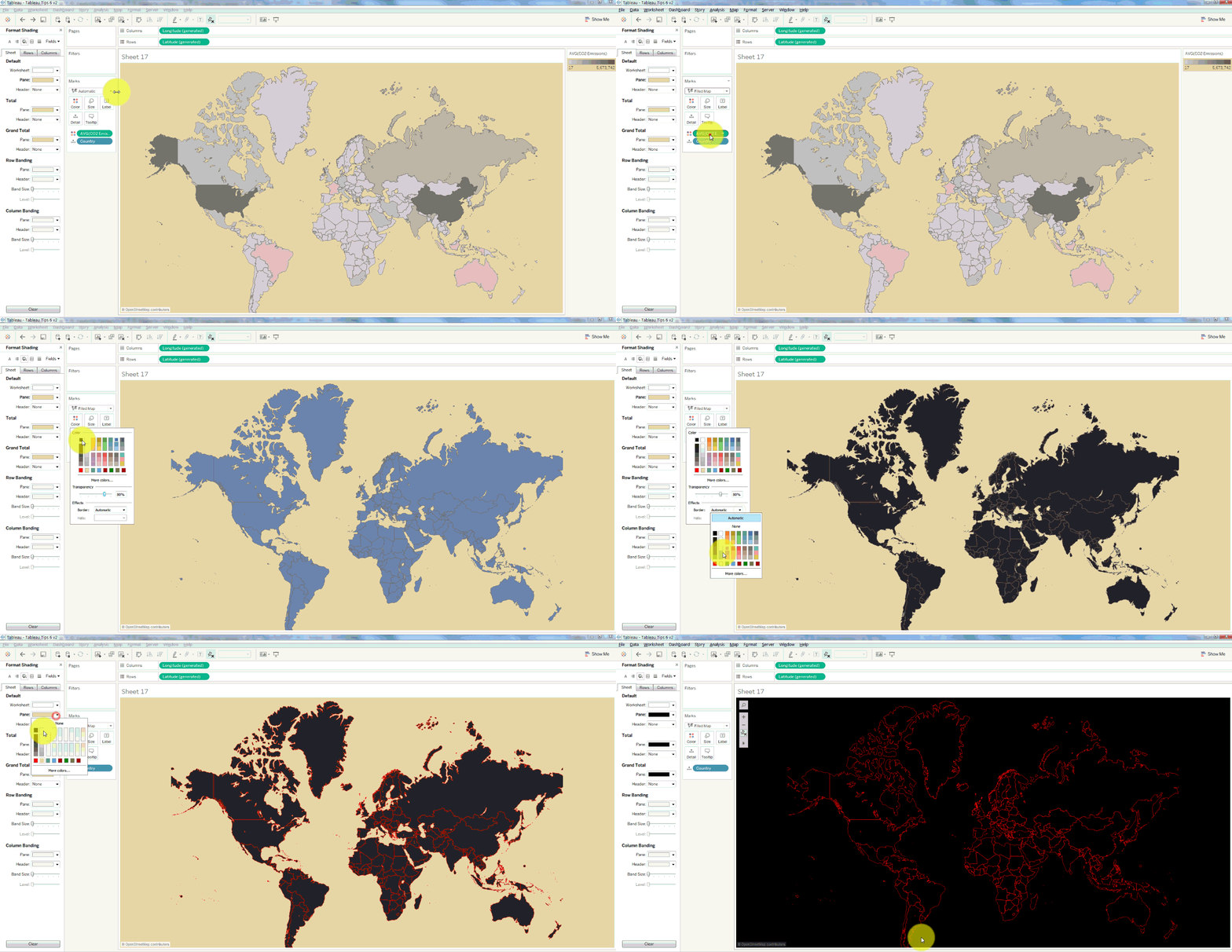
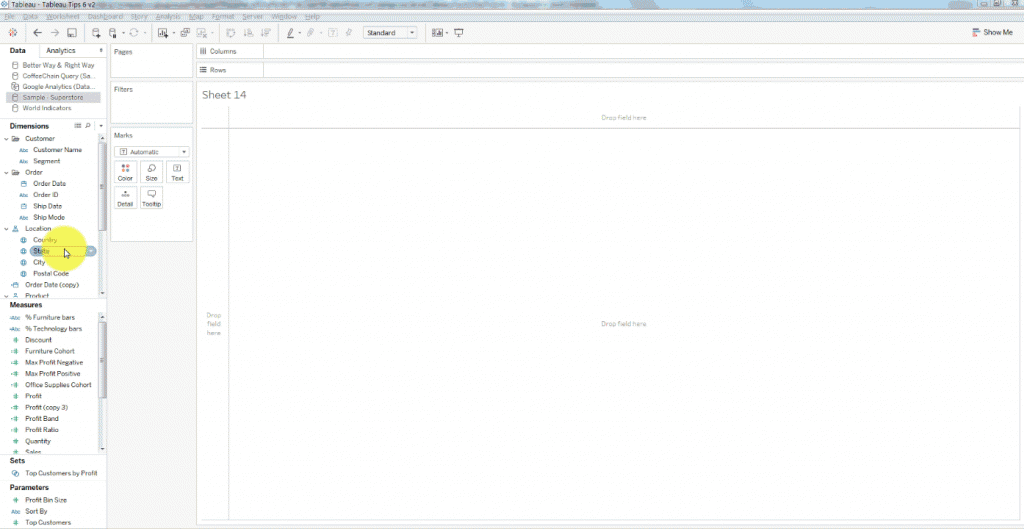
To do this in Tableau, you must remove the base layer which is similar as shown in the first step, we can then alter the Pane colour to change the colour of the water on the map to any colour we want. Once we get the base layer to be unchecked, all we have to do is simply right-click on the map and select ‘Format’ then select “Shading” and then alter the “Pane” colour to any shade of our choice.

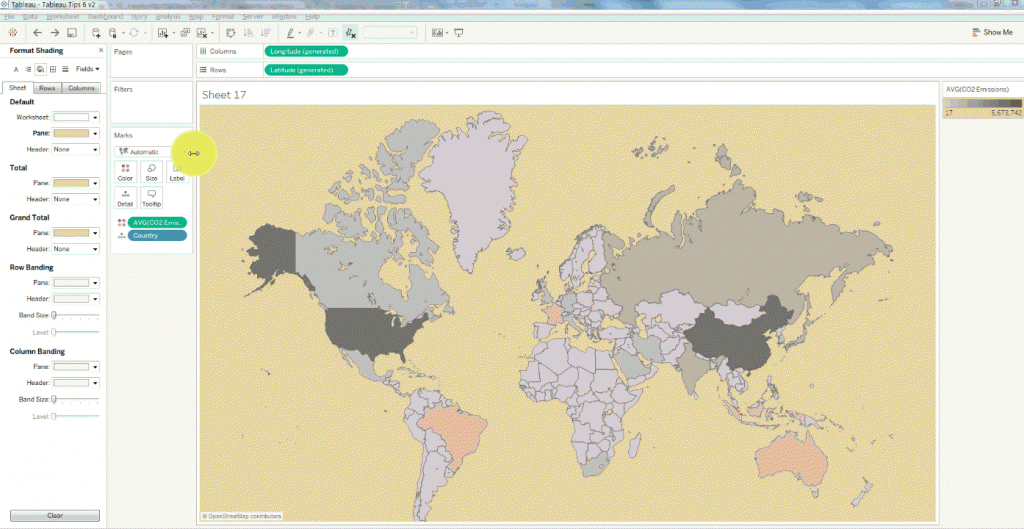
  1. Creating the countries of the world:

Just like the previously discussed step (step 3) we can start by making the borders of the countries. In this case we have also combined the step 4 where the pane colour has been changed to match. This has given rise to a red coloured outline of the countries of the world on a pitch-black background.
Creating the countries of the world:

Image Source: dataplusscience.com


For more details on Tableau Certification Training in Gurgaon and which are the prominent Tableau training institutes in Delhi follow our regular uploads on this site.


Interested in a career in Data Analyst?

To learn more about Data Analyst with Advanced excel course – Enrol Now.
To learn more about Data Analyst with R Course – Enrol Now.
To learn more about Big Data Course – Enrol Now.

To learn more about Machine Learning Using Python and Spark – Enrol Now.
To learn more about Data Analyst with SAS Course – Enrol Now.
To learn more about Data Analyst with Apache Spark Course – Enrol Now.
To learn more about Data Analyst with Market Risk Analytics and Modelling Course – Enrol Now.

Call us to know more